Chitchat Angular Theme
Welcome to Chitchat!
We are pleased that you have chosen CHITCHAT theme for your site and we will not disappoint you with your choice. Chitchat is an excellent theme develop with a concise approach. The code written is a clean and well structured.
Chitchat is the most powerful & responsive theme with all the modules and functions involved with an attractive design.
Chitchat theme template is build focusing on HTML & SCSS works perfectly fine in all the browsers and without jQuery.
Chitchat theme include 3 in 1 (chat app, landing-page & email template), 17 inner pages
We request to have a look at our Chitchat manual to know brief about the theme! We have compromised each and every detail for you in the manual that you will need.
If we are unable to answer your queries beyond our documentation, you are free to contact us through the themeforest support page with your site. We will be happy to cater you and will get back to you in no time.
Read the manual before jumping to start!
Theme Features
- Authentication : Used authentication with simple localstorage .
- Responsive Design : Looks great on desktops, laptops, tablets and mobiles. Give it a try on your iPhone or iPad now.
- RTL Supported : Chitchat messenger page has RTL supported.
- Made with Sass : Chitchat is made with sass.
- Multi-Browser Support : Chitchat has multi browser support.
- Fully Customizable : You can also customize Chitchat Messenger page.
- Bootstrap : Chitchat made by bootstrap 5.3.3 version.
- Google Font : You can use unlimited Google fonts.
- Dark Supported : Chitchat messenger page also support Dark Mode.
- Owl carousel slider : We have use for slider.
- Blog Page : There three different blog variation pages.
- Authentication Page : There are two different auth variation pages.
Folder Structure
When you unpack downloaded archive from ThemeForest.net you'll get folder containing 2 folders.
- Theme - Chitchat Main Folder
- Documentation - Documentation for Chitchat Angular site template
- Email-Template - Different Email templates in html
Folder Structure
- public
- assets
- css
- doc
- fonts
- images
- json
- scss
- svg
- favicon.ico
- assets
- src
- app
- components
- chat-board
- call-tab
- chat-tab
- contact
- search
- left-sidebar
- contact-tab
- document-tab
- favorite-tab
- nav
- notification-tab
- quick-box
- recent-slider
- search
- settings-tab
- status-tab
- main-nav
- login
- right-sidebar
- close-app
- files
- notes
- quick-profile
- reminder
- to-do
- chat-board
- landing-page
- content
- footer
- full-content
- header
- messenger
- pages
- login
- sign-up
- shared
- components
- data
- directive
- routes
- service
- app.html
- app.scss
- app.ts
- app.config.ts
- app.routes.ts
- components
- index.html
- main.ts
- style.scss
- tsconfig.app.json
- tsconfig.json
- tsconfig.spec.json
Start Building
Prerequisite
Install Node.js and NPM : Download the 20.19.0 version of Node.js from https://nodejs.org/en/download/ and install it on your system. NPM comes bundled with Node.jsTheme
When you extract file from download you will find following folder:
- Theme
- EmailTemplate
- Documentation
For Start working with running your Chitchat theme you need to follow below step:
- Extract theme folder
- npm i
- ng serve
- Once your frontend runs successfully you can see it in http://localhost:4200
Scss
- All Theme design related SCSS you can find from /public/assets/scss
- base
- component
- layout
- pages
- themes
- utils
- app.scss
- style.scss
- style1.scss
- style2.scss
- style3.scss
- style4.scss
- style5.scss
- style6.scss
Customizer
You can customise your Chitchat Messenger using customiser
To change the LTR mode to RTL or Change color from any color then you can just select the option from customiser as attached in below screenshot
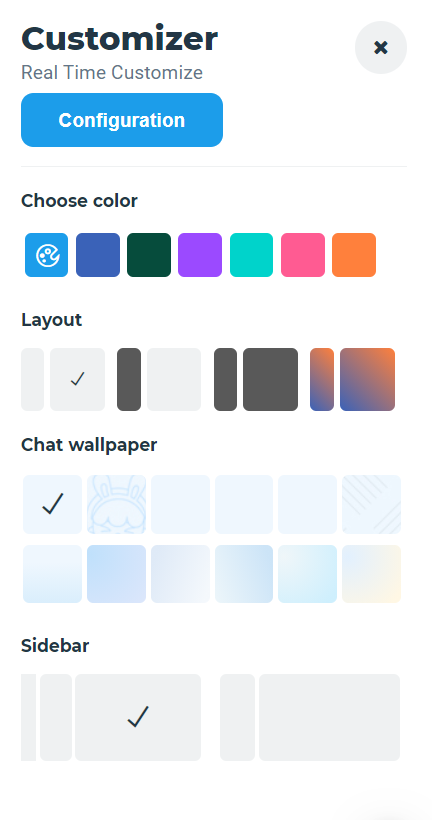
Now to customize theme you can select Color, Layout, Chat Wallpaper, Sidebar of your own choice.
By selecting you can change Color of whole Messenger theme.
In Layout you can select different layout option.
In Chat Wallpaper there are many options are there, by using them it change the wallpaper of your chat.
In Sidebar you can select any default sidebar .
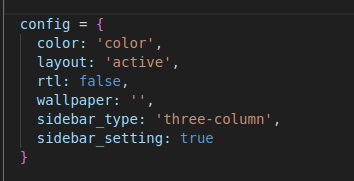
Now to change your project according to configuration which you have set you just need click on Configuration button and copy that config as displayed in below image and paste in config.json in src > app > shared > services > layout.service.ts
Remove Loader
How to Remove Loader from Application?
Go to app.component.html file in app.module.ts
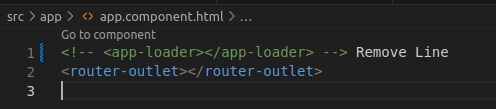
Remove design of loader
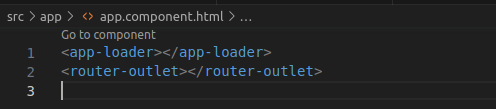
correspondingly remove methods of useEffect from tag in app.html and remove loader component
Remove Customizer
How to Remove default Customizer from Application?
You just need to removed called themecustomizer component from messenger: shared > components > customizer and remove customizer component selector. more.
Path: src > app > components > right-sidebar > right-sidebar.html

RTL
Suppose you want to add RTL in your application then you just need to set "rtl" to "true" so application will be converted in RTL layout. In layout.service file you need to change this changes path:=> "src > app > shared > services > layout.service.ts"
Fonts
You can set font of your choice in index.html
                    <!--Google font-->
<link href="https://fonts.googleapis.com/css?family=Montserrat:400,500,600,700,800&display=swap" rel="stylesheet">

                    <link href="https://fonts.googleapis.com/css?family=Roboto:400,500,600&display=swap"rel="stylesheet">

                    <link href="https://fonts.googleapis.com/css?family=Rubik:300,300i,400,400i,500,500i,700,700i,900,900i&display=swap"rel="stylesheet">