
Sidebar.
There are Numerous links in sidebar and if we write whole code in html then number of lines will increase by a lot. So to prevent that we have created a service file for the sidebar links so that we can loop through the array links that we have made in this service file and render our links accordingly.
You can find navservices.service.ts on the following path:
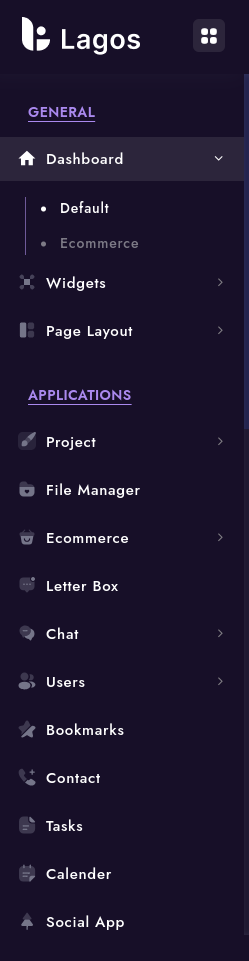
Making changes in sidebar.
If you require to make any changes in the sidebar, you could follow the given instructions.
To add links in sidebar:
If you need to add or remove links in the sidebar, all you need to do is make changes in the navmenu.service.ts file.
For Example:
Lets say we want to change the previous sidebar to the new sidebar.
To achieve this we can add new object in nav.service.ts, where we want to add the new link. Here we want to add new link in between Dashboard and widget links so we will make the following changes.
In navmenu.service.ts
      {
      level: 1,
      title: "Dashboards",
      icon: "home",
      type: "sub",
      active: true,
      children: [
        { path: "/dashboard/default", title: "Default", type: "link" },
        { path: "/dashboard/project", title: "Project", type: "link" },
        { path: "/dashboard/ecommerce", title: "Ecommerce", type: "link" },
        { path: "/dashboard/education", title: "Education", type: "link" },
      ],
    },
    {
      level: 1,
      title: "Widgets",
      icon: "widget",
      type: "sub",
      active: false,
      children: [
        { path: "/widgets/general", title: "General", type: "link" },
        { path: "/widgets/chart", title: "Chart", type: "link" },
      ],
    },
    {
      level: 1,
      title: "Page Layout",
      icon: "layout",
      type: "sub",
      active: false,
      children: [
        { path: "/page-layout/hide-nav-scroll",title: "Hide Nav Scroll",type: "link" },
        { path: "/page-layout/footer-dark",title: "Footer Dark",type: "link" },
        { path: "/page-layout/footer-light",title: "Footer Light",type: "link" },
        { path: "/page-layout/footer-fixed",title: "Footer Fixed",type: "link" },
      ],
    },
As you can see above, you will need add data in the predefined format. Title key will contain the text you need to display for the link. In the path key, you will need to add the path that you define in the router.
You can add icons before the link in ui by giving feather icon name in icon key. Here is the link for the feather icon you might want to you. https://feathericons.com/. Copy the name of the icon you want to show and paste it in before icon key.
If the link contains sub links add type : 'sub', and if there are no sub links , just add type: 'link'
For Example:If you want to add a link without any sublinks then add the following code.
    {
      level: 1,
      path: "/file-manager",
      title: "File Manager",
      icon: "file",
      type: "link",
    },
Note: Make sure that the path you enter in the json is same as the one that you have given in the router, or else error will be thrown as same path will not be found.
If you want to remove links from the sidebar:
As we added code in the above section to add new links in the sidebar. You simply need to remove the whole object to make it disappear from the sidebar.
For Example: We added the following code in the menu,json file. If we want to remove the same then we will remove the object in the array of links in navservices.service.ts.
In navservices.service.ts
    {
      level: 1,
      title: "Others",
      icon: "others",
      type: "sub",
      active: false,
      children: [
        {
          level: 2,
          title: "Error Page",
          type: "sub",
          active :false,
          children: [
            { path: "/error-page/error-400", title: "Error 400", type: "link" },
            { path: "/error-page/error-401", title: "Error 401", type: "link" },
            { path: "/error-page/error-403", title: "Error 403", type: "link" },
            { path: "/error-page/error-404", title: "Error 404", type: "link" },
            { path: "/error-page/error-500", title: "Error 500", type: "link" },
            { path: "/error-page/error-503", title: "Error 503", type: "link" },
          ],
        },
      ],
    },