
Calendar
Official link Preview linkWith a busy schedule, users might need something to keep track of the upcoming events. A calendar app has been provided, where users can enter the upcoming events and a tag will be added in the calendar. Now you don't have to worry whether you will remember the next scheduled meeting.
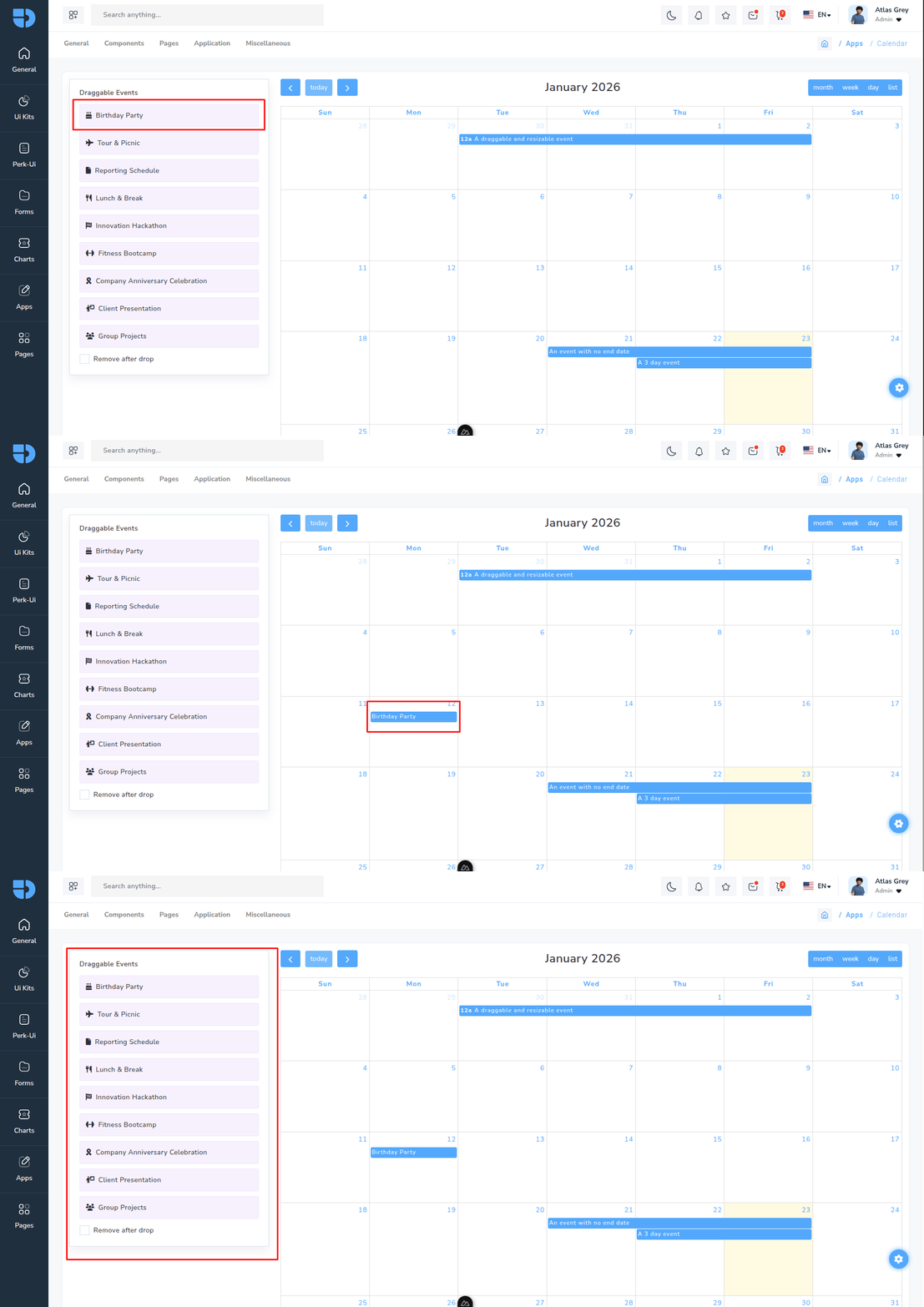
Installation
npm i @fullcalendar/core @fullcalendar/daygrid @fullcalendar/interaction @fullcalendar/list @fullcalendar/timegrid @fullcalendar/vue3calendar.vue
<template>
<div class="row" id="wrap">
  <div class="col-xxl-3 box-col-12">
    <div class="md-sidebar mb-3">
      <a class="btn btn-primary md-sidebar-toggle" href="#">calendar filter</a>
      <div class="md-sidebar-aside job-left-aside custom-scrollbar">
        <div id="external-events">
          <h6>Draggable Events</h6>
          <div ref="externalEventsList">
            <template v-for="event in defaultEventList" :key="event.title">
              <div class="fc-event fc-h-event fc-daygrid-event fc-daygrid-block-event" :data-title="event.title" draggable="true">
                <div class="fc-event-main"><i :class="`fa-solid ${event.icon} me-2`"></i>{{ event.title }}</div>
              </div>
            </template>
          </div>
          <p>
            <input class="checkbox_animated" id="drop-remove" type="checkbox" v-model="removeAfterDrop" />
            <label class="mb-0" for="drop-remove">Remove after drop</label>
          </p>
        </div>
      </div>
    </div>
  </div>
  <div class="col-xxl-9 box-col-12">
    <FullCalendar :options="calendarOptions" />
  </div>
</div>
</template>

<script setup lang="ts">import dayGridPlugin from '@fullcalendar/daygrid';
import interactionPlugin, { type DropArg } from '@fullcalendar/interaction';
import listPlugin from '@fullcalendar/list';
import timeGridPlugin from '@fullcalendar/timegrid';
import { startOfDay, endOfMonth, subDays, addDays, addHours } from 'date-fns';

import type { EventInput, EventMountArg } from '@fullcalendar/core';

export const removeAfterDrop = ref(false);

export const defaultEvents = [
  {
    id: 1,
    title: 'Birthday Party',
    icon: 'fa-cake-candles',
  },
  {
    id: 2,
    title: 'Tour & Picnic',
    icon: 'fa-plane',
  },
  {
    id: 3,
    title: 'Reporting Schedule',
    icon: 'fa-file',
  },
  {
    id: 4,
    title: 'Lunch & Break',
    icon: 'fa-utensils',
  },
  {
    id: 5,
    title: 'Innovation Hackathon',
    icon: 'fa-flag-checkered',
  },
  {
    id: 6,
    title: 'Fitness Bootcamp',
    icon: 'fa-dumbbell',
  },
  {
    id: 7,
    title: 'Company Anniversary Celebration',
    icon: 'fa-ribbon',
  },
  {
    id: 8,
    title: 'Client Presentation',
    icon: 'fa-person-chalkboard',
  },
  {
    id: 9,
    title: 'Group Projects',
    icon: 'fa-users',
  },
];


export const events = ref<Event[]>([
  {
    title: 'A 3 day event',
    start: subDays(startOfDay(new Date()), 1),
    end: addDays(new Date(), 1),
    allDay: true,
    background_color: '#7366FF',
    border_color: '#7366FF',
  },
  {
    title: 'An event with no end date',
    start: subDays(startOfDay(new Date()), 2),
    end: addDays(new Date(), 1),
    allDay: true,
    background_color: '#7366FF',
    border_color: '#ffb829',
  },
  {
    title: 'A long event that spans 2 months',
    start: subDays(endOfMonth(new Date()), 3),
    end: addDays(endOfMonth(new Date()), 3),
    allDay: true,
    background_color: '#838383',
    border_color: '#838383',
  },
  {
    title: 'A draggable and resizable event',
    start: subDays(startOfMonth(new Date()), 2),
    end: addDays(startOfMonth(new Date()), 2),
    background_color: '#ffb829',
    border_color: '#ffb829',
  },
]);

export const calendarOptions = ref({
  plugins: [dayGridPlugin, timeGridPlugin, interactionPlugin, listPlugin],
  initialView: 'dayGridMonth',
  headerToolbar: {
    left: 'prev today next',
    center: 'title',
    right: 'dayGridMonth,timeGridWeek,timeGridDay,listWeek',
  },
  editable: true,
  selectable: true,
  droppable: true,

  drop(info: DropArg) {
    const title = info.draggedEl.getAttribute('data-title') ?? ''; // 👈 fix for null
    const newEvent: Event = {
      title,
      start: info.date,
      allDay: info.allDay,
      background_color: '#7366FF',
      border_color: '#7366FF',
    };
    events.value.push(newEvent);

    if (removeAfterDrop.value) {
      info.draggedEl.remove();
    }
  },

  eventColor: '#378006',

  // Bind dynamic events
  events: events.value,
});
Uninstalling Package
npm uninstall @fullcalendar/core @fullcalendar/daygrid @fullcalendar/interaction @fullcalendar/list @fullcalendar/timegrid @fullcalendar/vue3