
Multi-Language Support
Considering that there will be users from multiple different countries,
you might want to add support for multiple languages.
Our theme uses vue-i18n for seamless translation
management.
You can find the language switcher dropdown in the header.
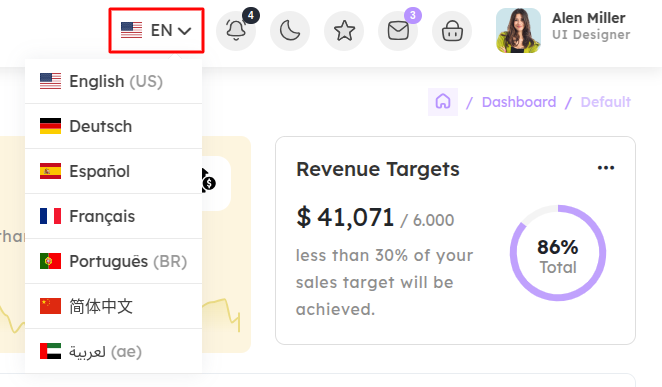
How does multi-language functionality work?
We use the official vue-i18n module.
You can install it with:
npm install vue-i18n
Below is an example configuration in main.ts:
import { createApp } from 'vue';
import type { DefineComponent } from 'vue';

import { createPinia } from 'pinia';
import 'bootstrap/dist/css/bootstrap.min.css';
import './assets/scss/app.scss';

import App from './App.vue';

import لعربية from './core/locales/ae.json';
import 简体中文 from './core/locales/cn.json';
import Deutsch from './core/locales/de.json';
import English from './core/locales/en.json';
import Español from './core/locales/es.json';
import Français from './core/locales/fr.json';
import Português from './core/locales/pt.json';

import router from './router';

const messages = {
  English,
  Deutsch,
  Español,
  Français,
  Português,
  简体中文,
  لعربية,
};

const i18n = createI18n({
  legacy: false,
  locale: 'English',
  fallbackLocale: 'English',
  messages,
});


const app = createApp(App);

app
  .use(createPinia())
  .use(router)
  .use(i18n)

app.mount('#app');
Translation files should be placed in:
src/core/locales/en.json, src/core/locales/de.json, etc.
Implementing Language Translate Feature:
After you finished installing above mentioned packages in your project, follow the below given steps to add the multi-language support.
Language.vue
Our Html component for language translate will look like this
<template>
  <div class="translate_wrapper" :class="{ active: layoutState.isLanguage }">
    <div class="current_lang" v-if="selectedLanguage">
      <div class="lang">
        <i :class="`flag-icon flag-icon-${selectedLanguage.icon}`"></i>
        <span class="lang-txt">{{ selectedLanguage.code }}</span>
      </div>
    </div>
    <div class="more_lang" :class="{ active: layoutState.isLanguage }">
      <div class="lang selected" v-for="(language, index) in languages" :key="index" @click="selectLanguage(language)">
        <i :class="`flag-icon flag-icon-${language.icon}`"></i>
        <span class="lang-txt"
          >{{ language.name }}
          <span v-if="language.country_code"> ({{ language.country_code }})</span>
        </span>
      </div>
    </div>
  </div>
</template>

<script setup lang="ts">
import { ref, onMounted } from 'vue';

import { storeToRefs } from 'pinia';
import { useI18n } from 'vue-i18n';

import { language } from '@/core/data/header';
import { useLayout } from '@/stores/layout';
import type { Language } from '@/types/header';

const layoutStore = useLayout();
const { layoutState } = storeToRefs(layoutStore);
const i18n = useI18n();

let languages = ref(language);
let selectedLanguage = ref<Language>({
  id: 1,
  name: 'English',
  code: 'en',
  icon: 'us',
  country_code: 'US',
  active: true,
});

onMounted(() => {
  const savedLang = localStorage.getItem('selectedLang');

  if (savedLang) {
    const found = languages.value.find(lang => lang.name === savedLang);
    if (found) {
      selectLanguage(found);
      return;
    }
  }

  languages.value.filter(details => {
    if (details.active) {
      selectLanguage(details);
    }
  });
});

function selectLanguage(language: Language) {
  i18n.locale.value = language.name;
  selectedLanguage.value = language;
  localStorage.setItem('selectedLang', language.name);
}
</script>

<style scoped></style>
header.ts
language data:
export const language: Language[] = [
    {
        id: 1,
        name: 'English',
        code: 'en',
        icon: 'us',
        country_code: "US",
        active: true
    },
    {
        id: 2,
        name: 'Deutsch',
        code: 'de',
        icon: 'de'
    },
    {
        id: 3,
        name: 'Español',
        code: 'es',
        icon: 'es'
    },
    {
        id: 4,
        name: 'Français',
        code: 'fr',
        icon: 'fr'
    },
    {
        id: 5,
        name: 'Português',
        code: 'pt',
        icon: 'pt',
        country_code: "BR"
    },
    {
        id: 6,
        name: '简体中文',
        code: 'cn',
        icon: 'cn'
    },
    {
        id: 7,
        name: 'لعربية',
        code: 'ae',
        icon: 'ae',
        country_code: "ae"
    }
]
JSON files for different languages
To translate words we have to provide the translation for each word, that we will do in a json file.
languages JSON for English Language en.json
{
    "general": "General",
    "dashboards": "Dashboards",
    "default": "Default",
    "ecommerce": "Ecommerce",
    "online_course": "Online course",
    "crypto": "Crypto",
    "social": "Social",
    "nft": "NFT",
    "school_management": "School management",
    "pos": "POS"
}
languages JSON for Deutsch Language de.json
{
    "general": "Allgemein",
    "dashboards": "Dashboards",
    "default": "Standard",
    "ecommerce": "E-Commerce",
    "online_course": "Online-Kurs",
    "crypto": "Krypto",
    "social": "Sozial",
    "nft": "NFT",
    "school_management": "Schulverwaltung",
    "pos": "POS"
}
languages JSON for Spanish Language es.json
{
    "general": "General",
    "dashboards": "Tableros",
    "default": "Predeterminado",
    "ecommerce": "Comercio electrónico",
    "online_course": "Curso en línea",
    "crypto": "Cripto",
    "social": "Social",
    "nft": "NFT",
    "school_management": "Gestión escolar",
    "pos": "POS"
}
languages JSON for French Language fr.json
{
    "general": "Général",
    "dashboards": "Tableaux de bord",
    "default": "Par défaut",
    "ecommerce": "Ecommerce",
    "online_course": "Cours en ligne",
    "crypto": "Crypto",
    "social": "Social",
    "nft": "NFT",
    "school_management": "Gestion scolaire",
    "pos": "POS"
}
languages JSON for Portuguese Language pt.json
{
    "general": "Geral",
    "dashboards": "Painéis de Controle",
    "default": "Padrão",
    "ecommerce": "Ecommerce",
    "online_course": "Curso Online",
    "crypto": "Cripto",
    "social": "Social",
    "nft": "NFT",
    "school_management": "Gestão Escolar",
    "pos": "POS"
}
languages JSON for Chinese Language cn.json
{
    "general": "常规",
    "dashboards": "仪表盘",
    "default": "默认",
    "ecommerce": "电子商务",
    "online_course": "在线课程",
    "crypto": "加密货币",
    "social": "社交",
    "nft": "NFT",
    "school_management": "学校管理",
    "pos": "POS"
}
languages JSON for Arabic Language ae.json
{
    "general": "عام",
    "dashboards": "لوحات القيادة",
    "default": "افتراضي",
    "ecommerce": "التجارة الإلكترونية",
    "online_course": "دورة تدريبية عبر الإنترنت",
    "crypto": "العملات المشفرة",
    "social": "اجتماعي",
    "nft": "رموز غير قابلة للاستبدال",
    "school_management": "إدارة المدرسة",
    "pos": "نقطة البيع"
}
Now we are all set to use language translation, you just have to use
$t('key') when you want a word to change when the language changes.
For Example:
Use a variable as follows:
{{ $t(some_variable) }}
Warning: Make sure that if you are using a
variable then you have added the translation for every word possible in
that variable in the json file.