
Multi-Language Support
Considering that there will be users from multiple different countries, you might need to add the support for multiple languages.To help you with that, we have made the sidebar compatible with the multiple language functionality.
You can find the dropdown that changes the language in the header.
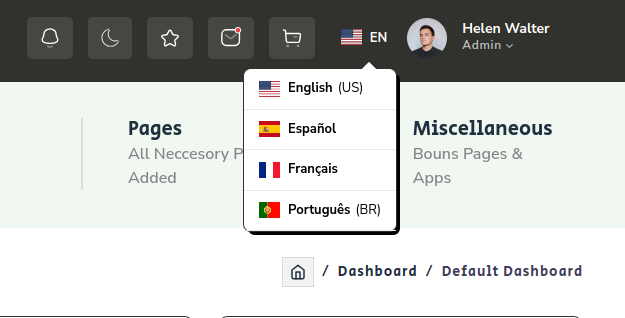
How does multi-language functionality works?
We have used the packages@ngx-translate/core and @ngx-translate/http-loader , you can install it by running the following commands in the terminal.
npm install @ngx-translate/corenpm install @ngx-translate/http-loaderYou will find language translator logic and design at below given path
src > app > shared > components > header > languages
Implementing Language Translate Feature
After you finished installing above mentioned packages in your project, follow the below given steps to add the multi-language support.
languages.html
Our Html component for language translate will look like this <div class="translate_wrapper" [class.active]="navServices.language">
<div class="current_lang">
<div class="lang">
<i class="flag-icon flag-icon-{{selectedLanguage.icon}}"></i><span class="lang-txt">{{selectedLanguage.code}}</span>
</div>
</div>
<div class="more_lang" [class.active]="navServices.language">
<div class="lang" data-value="en" (click)="changeLanguage(lang)" *ngFor="let lang of languages">
<i class="flag-icon flag-icon-{{lang.icon}}"></i>
<span class="lang-txt">{{lang.language}}<span *ngIf="lang.type">({{lang.type}})</span></span>
</div>
</div>
</div>languages.ts
Language change logic and configuration:
import { Component } from '@angular/core';
import { TranslateService } from '@ngx-translate/core';
import { NavService } from '../../../../shared/services/nav.service';

interface languageList{
  language? : string;
  code? : any;
  type? : string;
  icon? : string;
}

@Component({
    selector: 'app-language',
    templateUrl: './language.html',
    styleUrls: ['./language.scss'],
    imports: []
})

export class Language {

  public language: boolean = false;

  public selectedLanguage : languageList = {
    language: 'English',
    code: 'en',
    type: 'US',
    icon: 'us'
  }

  public languages : languageList[] = [{
    language: 'English',
    code: 'en',
    type: 'US',
    icon: 'us'
  },
  {
    language: 'Español',
    code: 'es',
    icon: 'es'
  },
  {
    language: 'Français',
    code: 'fr',
    icon: 'fr'
  },
  {
    language: 'Português',
    code: 'pt',
    type: 'BR',
    icon: 'pt'
  }]

  constructor(public navServices: NavService, private translate: TranslateService) { }

  ngOnInit() {
    this.changeLanguage(this.selectedLanguage);
  }

  changeLanguage(lang: languageList) {
    this.translate.use(lang.code)
    this.selectedLanguage = lang;
  }
}
JSON files for different languages
To translate words we have to provide the translation for each word, that we will do in a json file.
languages JSON for English Language en.json
{
    "Black Quality": "Black Quality",
    "Dashboards,widgets": "Dashboards,widgets",
    "Applications": "Applications",
    "Ready To Use Apps": "Ready To Use Apps",
    "Forms & Table": "Forms & Table",
    "Ready To Use Forms & Tables": "Ready To Use Forms & Tables",
    "Components": "Components",
    "UI Components & Elaments": "UI Components & Elaments",
    "Pages": "Pages",
    "All Neccesory Pages Added": "All Neccesory Pages Added",
    "Miscellaneous": "Miscellaneous",
    "Bouns Pages & Apps.": "Bouns Pages & Apps.",
    "Dashboard": "Dashboard",
    "Default": "Default",
}
languages JSON for Spanish Language es.json
 {
    "Black Quality" : "Nigra Kvalito",
    "Dashboards,widgets" : "Paneloj, widgets",
    "Applications" : "Aplikoj",
    "Ready To Use Apps" : "Pretaj Uzeblaj Aplikoj",
    "Forms & Table" : "Formoj & Tabelo",
    "Ready To Use Forms & Tables" : "Preta Uzebla Formoj kaj Tabeloj",
    "Components" : "Componentes",
    "UI Components & Elaments" : "Componentes e elementos da interface do usuário",
    "Pages" : "Páginas",
    "All Neccesory Pages Added" : "Todas as páginas necessárias adiBohoadas",
    "Miscellaneous" : "Diversas",
    "Bouns Pages & Apps." : "Páginas e aplicativos Bounss",
    }
languages JSON for French Language fr.json
{
    "Black Quality": "Qualité noire",
    "Dashboards,widgets": "Tableaux de bord, widgets",
    "Applications": "Applications",
    "Ready To Use Apps": "Applications prêtes à l'emploi",
    "Forms & Table": "Formulaires et tableau",
    "Ready To Use Forms & Tables": "Formulaires et tableaux prêts à l'emploi",
    "Components": "Composantes",
    "UI Components & Elaments": "Composants et éléments de l'interface utilisateur",
    "Pages": "pages",
    "All Neccesory Pages Added": "Toutes les pages nécessaires ajoutées",
    "Miscellaneous": "Divers",
    "Bouns Pages & Apps.": "Pages de primes et applications.",
}
languages JSON for Português Language pt.json
 {
    "Black Quality" : "Preto Qualidade",
    "Dashboards,widgets" : "Painéis, widgets",
    "Applications" : "Formulários",
    "Ready To Use Apps" : "Aplicativos prontos para usar",
    "Forms & Table" : "Formulários e Tabelas",
    "Ready To Use Forms & Tables" : "Formulários e tabelas prontos para usar",
    "Components" : "Componentes",
    "UI Components & Elaments" : "Componentes e elementos de interface do usuário",
    "Pages" : "Páginas",
    "All Neccesory Pages Added" : "Todas as páginas necessárias adiBohoadas",
    "Miscellaneous" : "Diversas",
    "Bouns Pages & Apps." : "Páginas e aplicativos de Bouns.",
    }
Now We just need to configure the settings for language change in our app.routes.ts file.
Add the following code in your app.routes.ts file.
// aa.config.ts

import { ApplicationConfig, importProvidersFrom } from '@angular/core';
import { provideAnimations } from '@angular/platform-browser/animations';
import { provideRouter } from '@angular/router';
import { HttpClient, provideHttpClient } from '@angular/common/http';
import { TranslateLoader, TranslateModule } from '@ngx-translate/core';
import { TranslateHttpLoader } from '@ngx-translate/http-loader';
import { routes } from './app.routes';

export function HttpLoaderFactory(http: HttpClient) {
  return new TranslateHttpLoader(http, './assets/i18n/', '.json');
}

export const appConfig: ApplicationConfig = {
  providers: [provideRouter(routes),
  provideHttpClient(),
  provideAnimations(),
  importProvidersFrom(
    TranslateModule.forRoot({
      loader: {
        provide: TranslateLoader,
        useFactory: HttpLoaderFactory,
        deps: [HttpClient]
      }
    }),
  ),
  ]
};
Now we are all set to use language translation, you just have to add | translate when you want a word to change when the language changes.
For Example:
Use a variable as follows:
{{ some_variable | translate }}Warning:Make sure that if you are using a variable then you have added the translation for every word possible in that variable in the json file.