 Change Android Package Name (React Native) :
NOTE :
The package name uniquely identifies your app on the Google Play Store and on the
device.
It must follow the format com.yourcompany.appname and must be changed
consistently across all files before generating a production build.
Once published, the package name cannot be changed.
update the package name manually across each file
listed below.
Replace all occurrences of com.oldpackage.name with
com.yourcompany.appname.
-
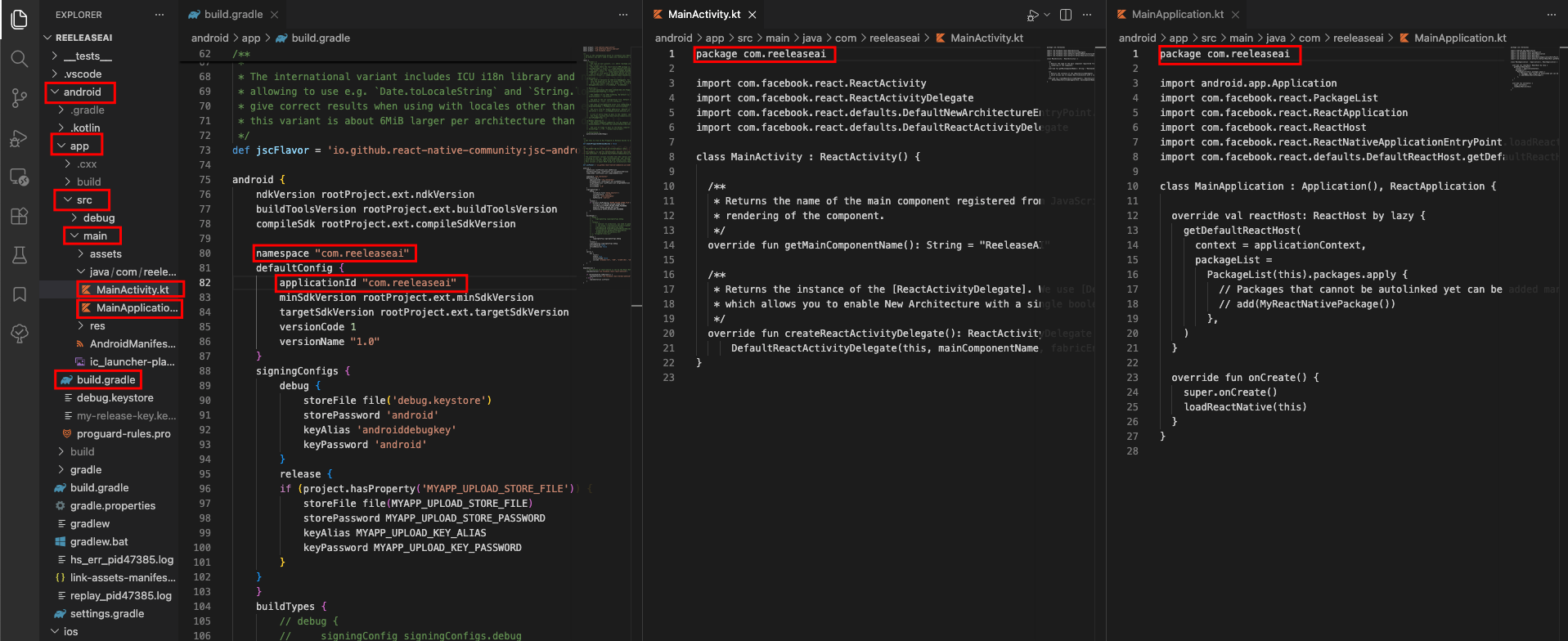
android/app/build.gradle
Update theapplicationIdfield:android { defaultConfig { applicationId "com.yourcompany.appname" // <-- change this ... } } -
android/app/src/main/AndroidManifest.xml
Update thepackageattribute on the root<manifest>tag:<manifest xmlns:android="http://schemas.android.com/apk/res/android" package="com.yourcompany.appname"> <!-- change this --> ... </manifest> -
android/app/src/main/java/ — Rename the folder structure
The Java source folder must mirror the package name. For example:- Old path:
android/app/src/main/java/com/oldpackage/name/ - New path:
android/app/src/main/java/com/yourcompany/appname/
- Old path:
-
MainActivity.java / MainActivity.kt
Update thepackagedeclaration at the top of the file:package com.yourcompany.appname; // <-- change this import com.facebook.react.ReactActivity; ... -
MainApplication.java / MainApplication.kt
Update thepackagedeclaration here as well:package com.yourcompany.appname; // <-- change this import android.app.Application; ... -
android/app/BUCK (if present)
Update thepackagefield:android_build_config( ... package = "com.yourcompany.appname", # <-- change this ) -
Clean & rebuild
After all files are updated, clean the build cache and rebuild:cd android ./gradlew clean cd .. npx react-native run-android
-
For a detailed reference on Android package naming conventions, consult
the official documentation:
📄 Official Guide: Set the Application ID — Android Developers