

 Create project in Visual Studio & Android Studio :
NOTE :
- Before running the app make sure you have import Collection json in
Firestore database which we have provided.
- Before import json in firestore database remember to give rule permission or
create Firestore Data.
See the Firebase Rules for create
Firestore
Database and how to give
permission
in firebase.
Also you can check below video for how to import json in firebase:
VIDEO URL :
https://youtu.be/Jd0sW8Wrc5Y?si=AxC6BmWBFwZfZU4a
Before you begin, make sure your development environment includes Flutter and Dart install in Android Studio or in Visual Studio or in Intelli J IDEA
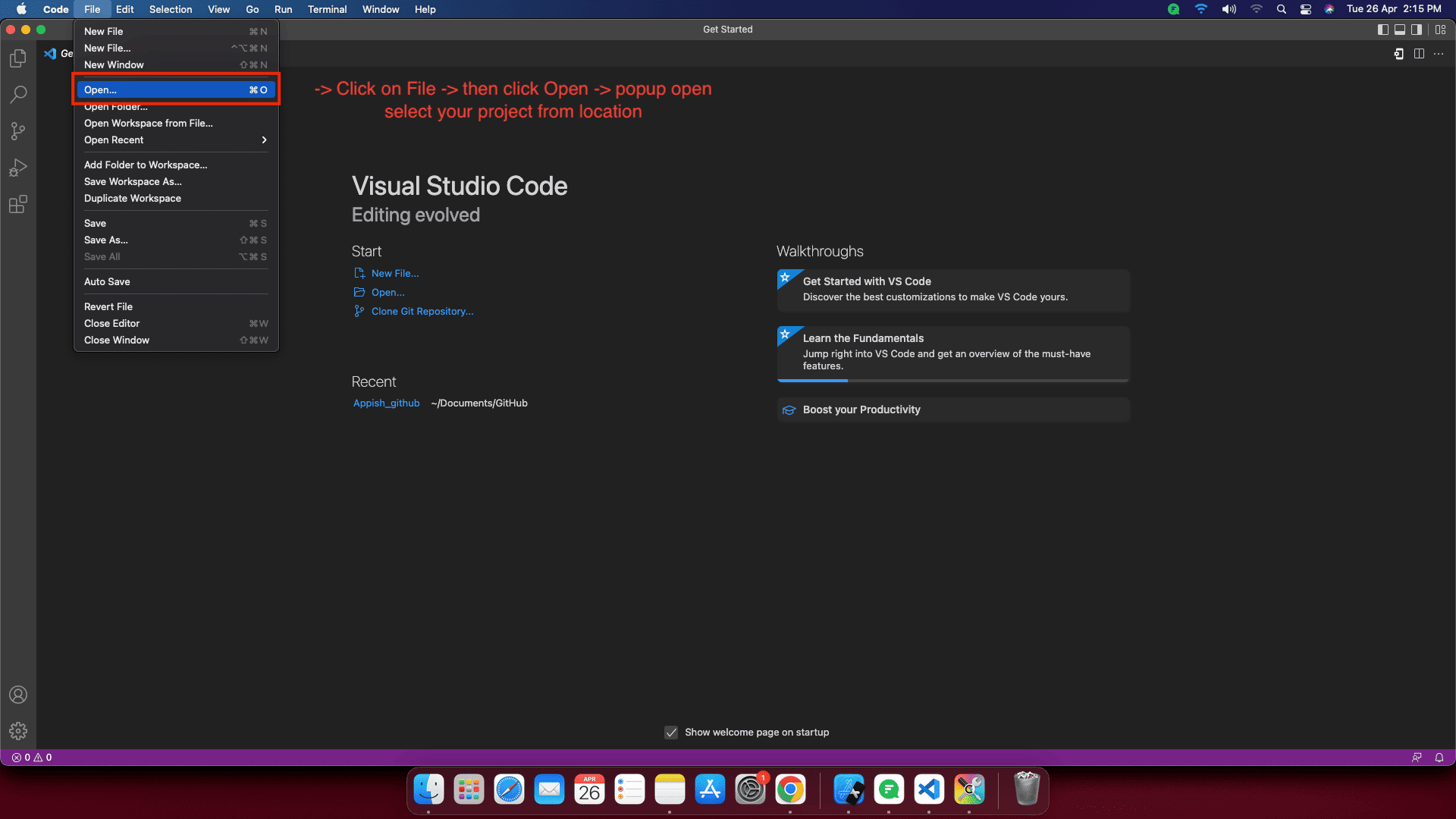
Create project in Visual Studio:
- Now open your project, go to File -> Open -> select your project from location.
- Replace Project name and Package name Chatzy with your name.
- Change Your title Name in main.dart

- ANDROID - Change Your App Name in AndroidManifest.xml

- IOS - Change Your CFBundle Name in Info.plist

Create project in Android Studio:
- Create new project, select flutter path -> select location where project create -> give your project name.
- Replace Project name and Package name Chatzy with your name.


- Change Your title Name in main.dart

- ANDROID - Change Your App Name in AndroidManifest.xml

- IOS - Change Your CFBundle Name in Info.plist
