 Welcome to WAPI!
Overview
The **Currency Management** module is the financial foundation of your WAPI ecosystem. It enables administrators to manage multiple world currencies, defining their precision, display symbols, and conversion rates relative to a base reference (USD). This global financial layer ensures that subscription pricing, transactional billings, and revenue reporting remain accurate across diverse international markets.
By centralizing currency controls, you can offer localized pricing strategies, manage decimal rounding for high-precision transactions, and ensure that your platform’s financial identity aligns with your global user base. All calculations within the platform are dynamically converted based on the exchange rates defined in this module.
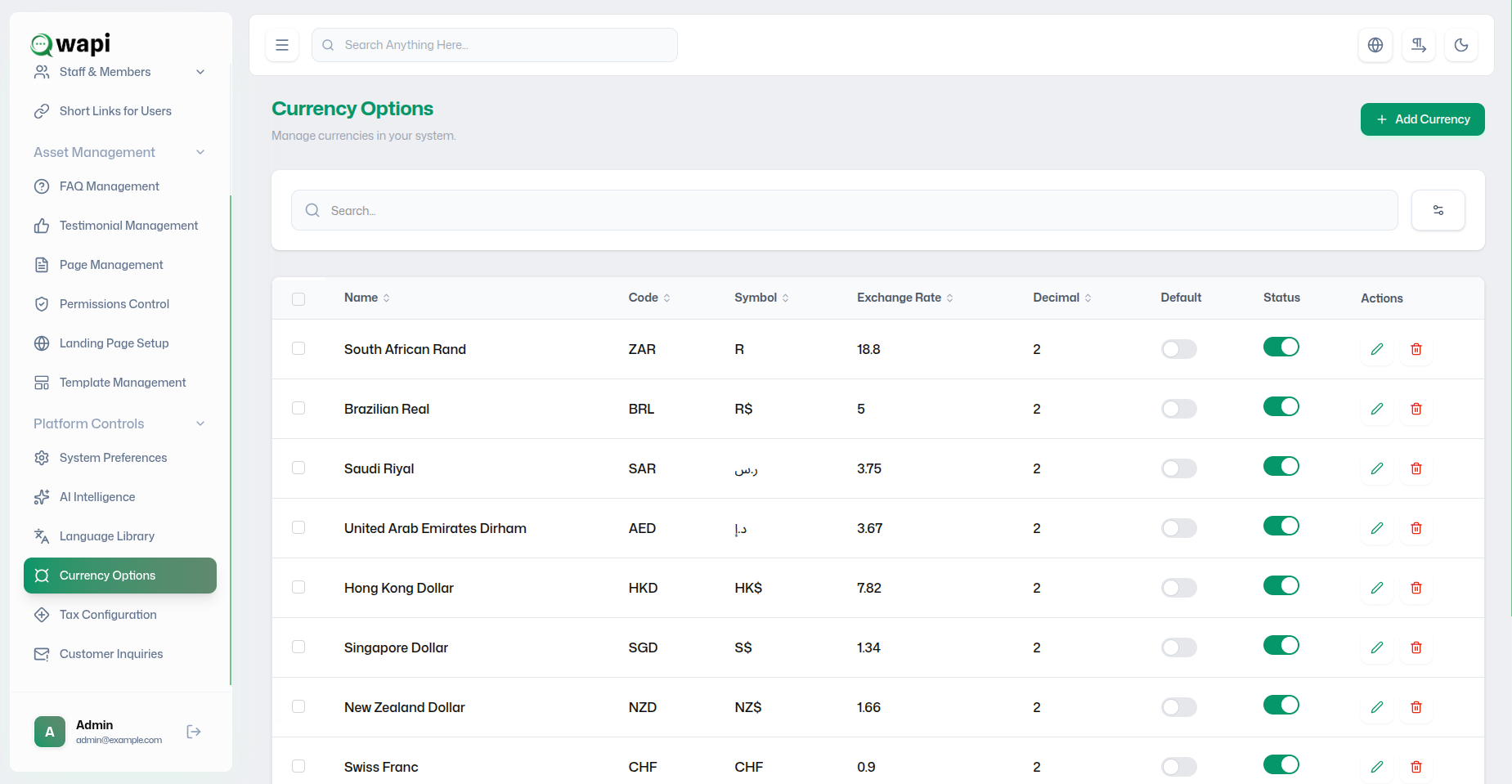
Currency Portfolio Architecture
The master list facilitates real-time auditing of your supported currencies:
| Financial Field | Resource Description |
|---|---|
| Currency Name | The full display name (e.g., "Singapore Dollar", "Euro"). |
| Currency Code | Standard 3-letter ISO code (e.g., `SGD`, `EUR`, `BRL`). |
| Symbol | The glyph used for UI price displays (e.g., `$`, `R$`, `S$`). |
| Exchange Rate | The conversion value relative to 1 USD (e.g., 1 USD = 1.34 SGD). |
| Decimal Precision | Defines rounding (e.g., `2` for 10.50, `0` for whole numbers). |
| Default Status | Marked 'YES' for the base currency used for primary calculations. |
Financial Config Protocol
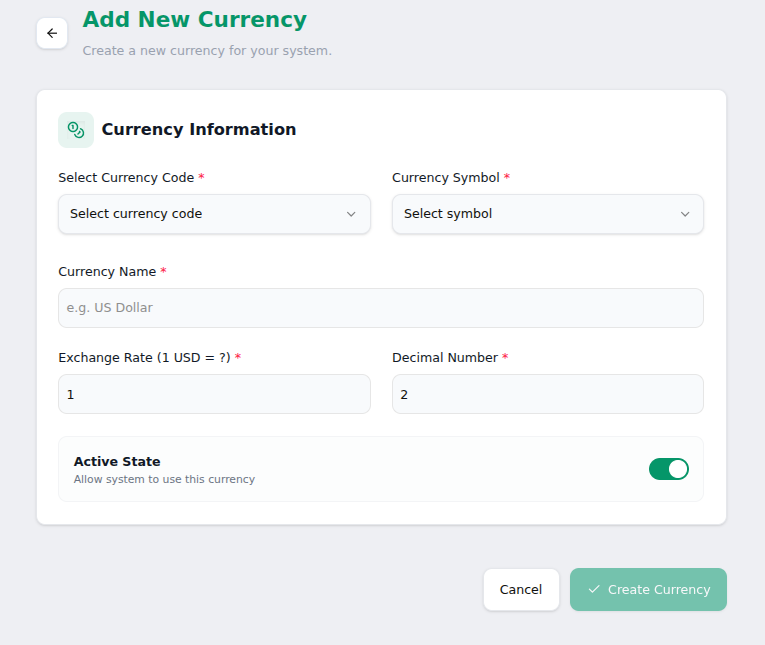
Exchange Rate & Decimal Logic
The USD Base Reference
WAPI uses a USD-centric conversion model. Administrators must manually enter the current conversion value to ensure billing accuracy:
- Formula: 1 USD = `[Exchange Rate]` of the new currency.
- Example: If 1 USD equals 18.8 ZAR, enter `18.8` in the rate field.
- Update Cycle: Regularly review rates to account for market volatility.
Precision Controls
- Standard Precision: Use `2` for most currencies (e.g., $10.99).
- Zero Decimals: Use `0` for currencies like JPY or KRW where fractional amounts are not used.
- UI Impact: Decimal settings directly affect how invoices and summaries are rendered.
Financial Best Practices
- Default Stability: Avoid changing the "Default Currency" frequently, as it anchors all historical revenue reporting.
- ISO Compliance: Always use standard 3-letter ISO codes to ensure compatibility with payment gateways like Stripe.
- Active Validation: Deactivate unused currencies to minimize user confusion during checkout.
- Decimal Uniformity: Keep decimal precision consistent across similar regional currencies to avoid rounding discrepancies.
CRITICAL AUDIT ALERT
Deleting a currency that is currently linked to active subscription plans or historical invoices can cause database referencing errors. Always **Deactivate** instead of **Delete** for existing records.