 Welcome to WAPI!
Overview
The Campaign module is the mission control for your WhatsApp marketing strategy. It enables businesses to broadcast approved message templates to targeted audiences, either through instant delivery or strategic scheduling. This ensures high-impact communication for promotions, reminders, and customer notifications directly to the most personal communication channel available.
Bulk Broadcasting
Reach thousands of contacts simultaneously with Meta-approved message templates.
Intelligent Scheduling
Plan campaigns in advance and set specific delivery dates and times for maximum engagement.
Real-time Tracking
Monitor sent, delivered, and read statuses instantly as the campaign progresses.

Campaign Intelligence Dashboard
The campaign list page provides immediate insights into your marketing performance and platform limits.
10 / 50
1,240
85%
- Remaining Campaign Limit: Your current plan's remaining allocation.
- Sent / Delivered / Read: Core conversion funnel tracking.
- Campaign Status: Indicators for Completed, Live, Draft, or Suspended.
Campaign Creation Protocol
Launching a successful campaign follows a 5-step sequential workflow to ensure proper targeting and content accuracy.
Basic Information
Define the campaign's identity. Use clear names like "Summer Sale 2024 - Newsletter" for easier internal tracking.

WhatsApp Configuration
Select the source WABA ID and choose from your approved message templates (Marketing, Utility, etc.).

Variable Mapping
Inject dynamic values (Coupon Codes, Expiration Times) into placeholders. Preview the message in real-time.

Recipients
Select your audience: All Contacts, Specific Individuals, or Segments by Tags (labels).

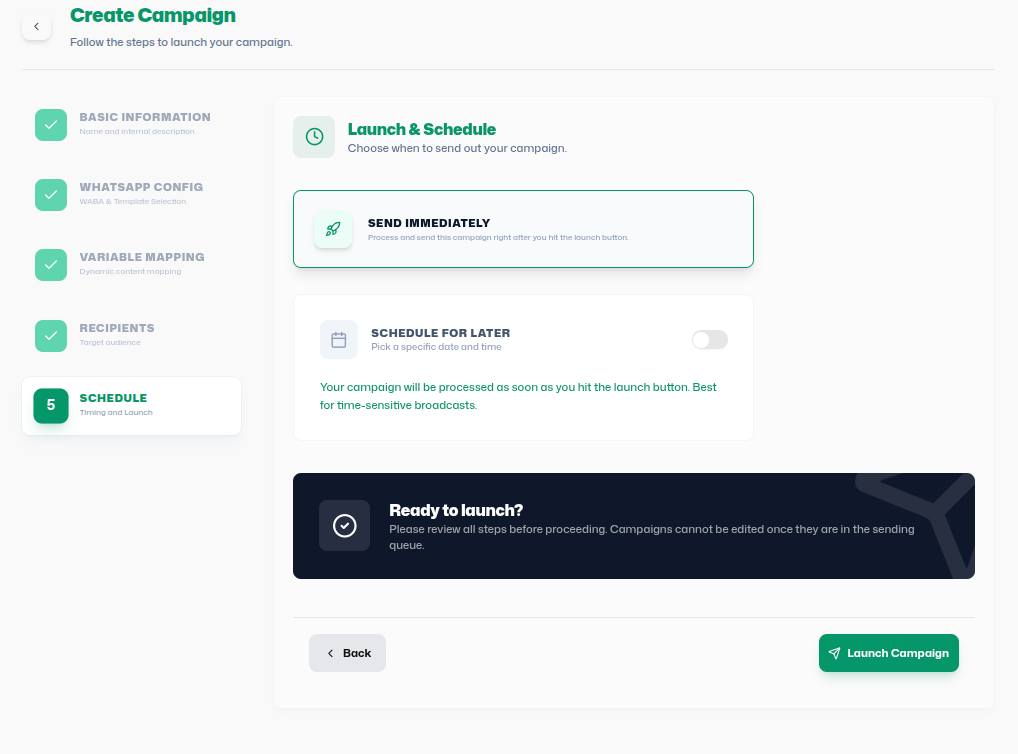
Schedule & Launch
Choose to "Send Immediately" or "Schedule for Later" for future automated delivery.
Subscription Filtering (Avoid Unsubscribers)
The platform includes a robust subscription management system to ensure compliance with messaging
policies. The Avoid Unsubscribers toggle determines how the campaign handles contacts
who have opted out.
Avoid Unsubscribers: Enabled
Behavior: The system will automatically
filter out any contact where is_unsubscribed is true. These
contacts will not receive the campaign message.
Avoid Unsubscribers: Disabled
Behavior: The system will bypass the subscription check. Messages will be sent to all selected contacts, even if they have previously unsubscribed.
Note: While disabling this filter allows you to reach unsubscribed contacts (useful for critical service alerts), frequent use for marketing may lead to higher report rates and potential WABA suspension.
Operational Logic & Workflow
Create
Select Template
Map Variables
Schedule
Once launched, messages are dispatched via the WhatsApp Business API. Real-time analytics monitor the status from "Sent" (dispatched) to "Delivered" and finally "Read" (opened), allowing users to measure the full engagement funnel.
Strategic Governance
Best Practices
- Personalization: Use Variable Mapping to address customers by name or provide unique codes.
- Strategic Timing: Use Schedule for Later to reach customers during peak engagement hours.
- Targeting: Use Segmentation by Tags to avoid spamming irrelevant contacts.
Troubleshooting
- Template missing: Verify it is approved in Meta Manager.
- No sending: Check WABA selection or credit balance.
- Invalid mapping: Ensure all placeholders have matching values.